
Projects and sites
Projects, work breakdown structures, daily field reports and progress records.
Illustrative workflow: Project · Plan · Site · Progress.
MPANDO HUB is the construction management and trade network product of MPANDO GLOBAL Inc. It connects contractors, subcontractors, suppliers and property teams around project operations, site management, procurement, inventory, sales CRM and operational finance.
A product of MPANDO GLOBAL Inc.
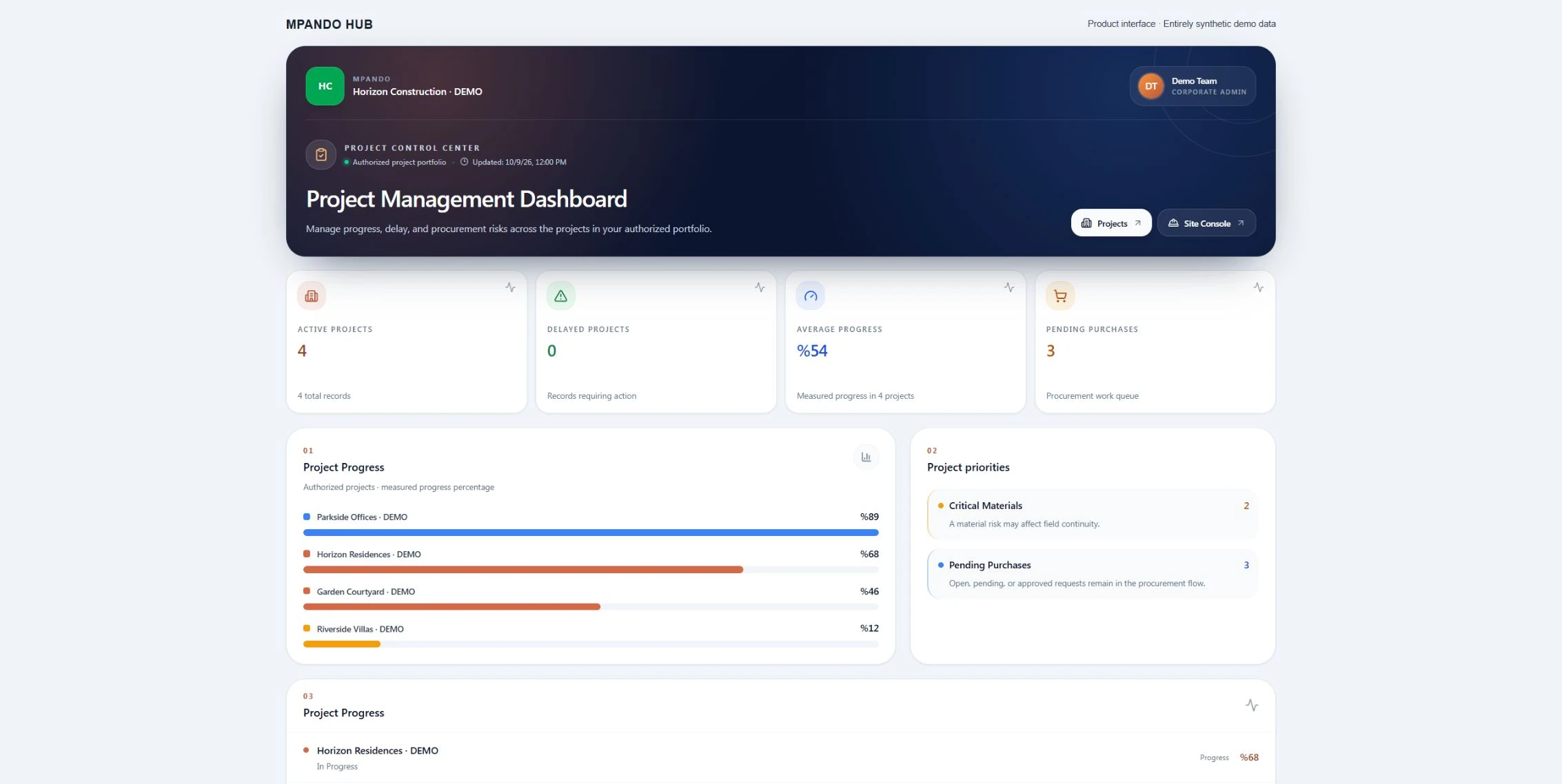
The current MPANDO project and procurement dashboards are shown with entirely synthetic data. No customer or company records are displayed.
Review the plan alongside site progress. Work packages, owners, dates and approval needs stay within the same project context.
View larger screen ↗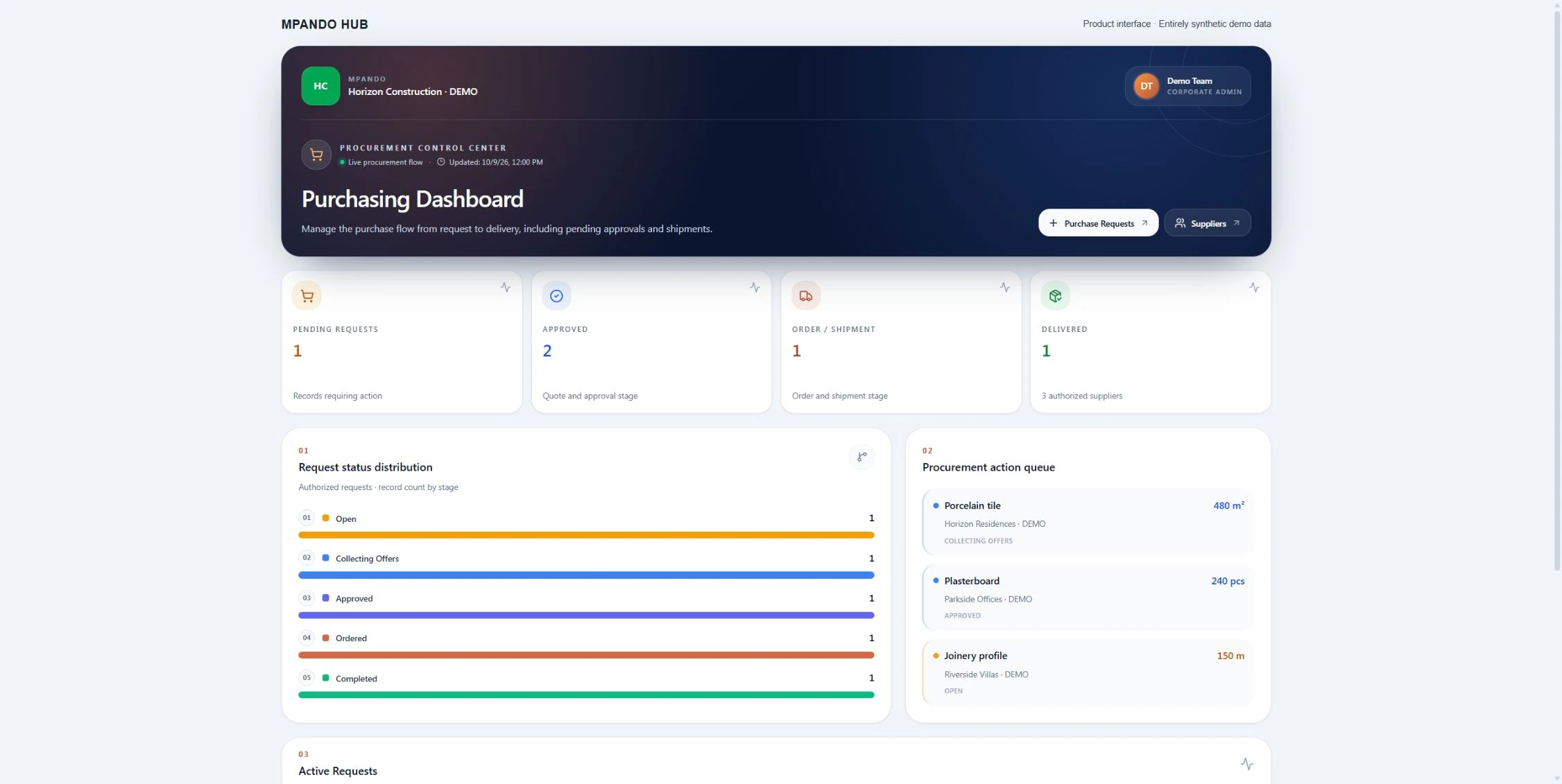
Track the request, received quotations, decision status and purchase order separately. An order is distinct from delivery and goods receipt.
View larger screen ↗The current MPANDO project and procurement dashboards are shown with entirely synthetic data. No customer or company records are displayed.
Commercial expansion is being prepared market by market. MPANDO HUB is not yet commercially offered in Switzerland and is not part of current UAE/GCC partnership sales. Contact our team about availability and implementation in other markets. Existing members retain access within their agreed service scope.
Explore scope and how we workTell us where you intend to use MPANDO HUB and which workflow you want to review. Our team will assess market availability and your requirements before agreeing the scope and next step for a demonstration.
MPANDO HUB
[email protected]Our team has received your request. Our team will review your intended country of use and requested workflow, then contact you at the email address provided about availability and the next step. Submitting this request does not confirm a demo appointment or activate a subscription.
MPANDO HUB is a construction management and trade network product from MPANDO GLOBAL Inc. It brings contractors, subcontractors, suppliers and property sales teams around connected project, site, procurement, inventory, sales CRM and operational finance workflows.
The aim is to make the connections in your work easier to follow: from a material requirement to purchasing and delivery tracking, and from project progress to the customer conversation. A tailored demo can follow the perspective of site teams, procurement, sales or company management.
We start by reviewing team structure, existing records, access needs and priority workflows. Data migration, integrations, training and country-specific accounting requirements are scoped separately. Operational finance features do not by themselves establish statutory accounting or tax compliance in every jurisdiction.
From planning to delivery, from the site to sales: bring your teams into the same workflow.
Projects, work breakdown structures, daily field reports and progress records.
Requests for quotation, supplier comparison, approvals and orders.
Delivery, goods receipt, materials and inventory movements.
Subcontract work, teams, attendance and progress payment records.
CRM, property inventory, offers, reservations and presentations.
Operational finance, reporting and company-based access.
Manage projects, field work and commercial decisions in context.
Follow work packages, quotations, crews and progress records.
Connect material requests to quotations and purchase orders.
Keep clients, shared portfolios and sales opportunities together.
Explore the product areas that work together.
Module scope and access rights are defined around your company's needs during the demonstration.
Projects, work breakdown structures, daily field reports and progress records.
Illustrative workflow: Project · Plan · Site · Progress.
Requests for quotation, supplier comparison, approvals and orders.
Illustrative workflow: Request · Quote · Approval · Order.
Delivery, goods receipt, materials and inventory movements.
Illustrative workflow: Order · Delivery · Receipt · Inventory.
Subcontract work, teams, attendance and progress payment records.
Illustrative workflow: Work · Quote · Team · Progress.
CRM, property inventory, offers, reservations and presentations.
Illustrative workflow: Client · Portfolio · Offer · Sale.
Operational finance, reporting and company-based access.
Illustrative workflow: Record · Document · Approval · Report.
Connect authorized contractors, subcontractors and suppliers around defined work, quotation and delivery records. Company and project permissions determine the information each participant can use.
Discuss supported CAD/DXF/DWG inputs, quantity review and material-recipe requirements in the demonstration. File suitability and the exact workflow are confirmed before inclusion; an imported drawing is not a certified quantity survey.
Bring customer follow-up, shared property information and sales opportunities into the configured workspace. Portfolio access, offers and approvals follow the permissions assigned to the team.
Follow project teams, work packages and attendance information within the enabled modules. Responsibility for approving time and linking it to progress records is established during setup.
Evaluate the specific AI or communication task, permitted data, provider and human approval step. Available integrations and external delivery channels are confirmed for the agreed setup.
An MTWIN presentation can be scoped around approved project and unit information. Data source, mapping, update frequency and ownership are defined separately from the visual model.
Set company, project and role permissions according to responsibilities. Agree onboarding, support and acceptance criteria for the configured system and demonstrate sensitive workflows using sample data.
Manage projects, field work and commercial decisions in context.
Discuss this scopeFollow work packages, quotations, crews and progress records.
Discuss this scopeConnect material requests to quotations and purchase orders.
Discuss this scopeKeep clients, shared portfolios and sales opportunities together.
Discuss this scopeMPANDO HUB is a product of MPANDO GLOBAL Inc., designed to connect the companies and teams behind construction projects. For work across countries, start with a shared project structure and define local units, currencies, working languages, responsibilities and reporting needs. The implementation is assessed against the actual workflow, from site demand and partner quotations to delivery and property sales.
Explore the project guide →A useful construction software demo starts with work your team recognizes. For a general contractor, home builder or specialty trade, that could be a finish package moving from field requirements to vendor quotes and installation. Use fictional project data to agree how MPANDO HUB should connect the people, records and approvals involved.
Start with a superintendent's material request for a defined building, floor or unit. Include the current drawing revision, dimensions, quantity, unit and required delivery date. Identify the person who can approve a product substitution. A change in scope should remain visible to the project manager before purchasing proceeds.
Review the same scope across quotes: material specification, package quantities, freight, unloading, quoted tax treatment and exclusions. Keep the job reference and your cost-code structure available for the agreed reporting setup. Walk through one revised quote and identify who can approve the purchase order.
Use a partial delivery to discuss accepted quantities, shortages and damaged items. Then review the supporting record needed by the office before a vendor bill is processed. Keep a homeowner's finish selection, an approved scope change and a purchasing decision identifiable as separate steps, with a named owner for each.
Tell us whether you are a general contractor, home builder, remodeler, specialty contractor, supplier or property sales team. Choose one job and the handoff you want to improve first. A demonstration can use fictional records.
MPANDO HUB connects contractors, subcontractors, suppliers and real estate teams across project and site management, purchasing, goods receipt and inventory, subcontract work, crews, property sales CRM and operational finance. Available modules and permissions are matched to the company’s agreed setup.
A requirement can progress through requests for quotation, offer comparison, approval and ordering. Delivery, goods receipt, inventory movement and allocation are tracked as distinct events. Creating an order or uploading an invoice does not by itself mean that materials have been received or consumed.
The professional trade network supports authorized company and partner workflows. Contractors, subcontractors and suppliers participate through their relevant work, quotation and delivery records. Access is determined by company, project, role and enabled modules.
Teams can work with customers, property inventory, offers, reservations and project presentations within their configured workspace. Shared portfolio access and sales approvals depend on permissions. A visual presentation and an authorized sales transaction remain different actions.
Project teams can follow work packages, attendance and progress-payment information alongside operational financial records and reports. Local payroll, statutory accounting and tax requirements must be assessed for the deployment; they are not assumed to be certified merely because a finance module is available.
Supported drawing and quantity workflows, AI assistance and communication features are scoped during the demonstration. File formats, data access, providers and human approval requirements are clarified. Ask to see the specific workflow your team intends to use rather than assuming every integration is included.
Choose the first workflow, team size and company roles. Demonstrate it with sample data, agree permissions and setup, then define onboarding, training, support and acceptance criteria. Existing members continue to sign in at mpando.tr; this website introduces the product and supports inquiries.
Your proposal and contract specify the duration and start date of the agreed warranty commitments. They distinguish the delivered software scope, configuration and data migration services, acceptance criteria and how software defects are handled. Support and maintenance periods are also stated separately. One standard warranty period does not automatically apply to every module, service or contract.
Choose one job with a material package and a trade partner. Follow the field request, competing vendor quotes, purchase approval and partial delivery. Include a changed specification and ask who sees it, who approves it and which version is used. Review project access from the superintendent, project manager, buyer and office perspectives. Agree which records and reports are part of your MPANDO HUB setup, and record any gap before onboarding.
Start by identifying which system owns each job, vendor, purchase order and financial record. Share sanitized sample files and your job or cost-code structure. Assess field mapping, units, document references, duplicates, approval status and correction handling before agreeing an import or connection. Use a small pilot to check the handoff. Compatibility with QuickBooks, Sage or another named system must be confirmed for your configuration; it is not implied by the availability of operational finance features.
The proposal depends on company structure, enabled modules, users and partner roles, project volume, data preparation, integrations, training and support. Ask which setup and ongoing costs are included, how changes are charged and what counts as acceptance. A tailored quotation is more useful than a price that hides these assumptions.
Company, project, role and module permissions define the intended access. Demonstrate a supplier quotation, a subcontractor task and a restricted financial view with different accounts. Agree device and connection requirements, data export, hosting, retention and support arrangements during assessment; offline operation and specific certifications are not assumed.
MPANDO HUB is the construction management software and trade network product of MPANDO GLOBAL Inc. It connects contractors, subcontractors, suppliers and property professionals around shared project workflows. MPANDO GLOBAL Inc. is a multi-sector corporate group also providing specialist solutions through MFABER and MTWIN.
An international project can be assessed against its company structure, sites, partner roles, working languages, units, currencies and reporting needs. This assessment does not confirm commercial availability in every country. Languages on this product website do not establish that the same languages or local tax functions are available in the member application. Confirm availability for the intended market first, then review the required workflows and accounting interfaces in a demonstration. MPANDO HUB is not yet commercially offered in Switzerland and is not part of the current UAE/GCC partner sales offering.
Keep the ordered, delivered, accepted and used quantities separate. For example, if 100 items were ordered and 60 arrived, including 10 damaged items, the team should be able to explain the 40 outstanding items, 50 accepted items and 10 awaiting a decision. Use this scenario in your HUB demonstration and agree who records discrepancies, accepts materials and approves any return.
A new inquiry starts a follow-up process. It does not reserve a unit or record a completed sale. In the configured CRM workflow, review the customer, responsible consultant, unit, offer and approval steps separately. Agree who can change availability, approve a reservation and confirm contract or payment information, so that marketing activity and commercial commitments remain clear.
Keep the original scope and quote available, then describe the proposed revision, affected quantities, price and schedule impact. Identify the client or project approval required and the person authorized to revise the purchase. In the HUB demonstration, ask to follow the agreed revision through the records your team will use. A client discussion, a vendor quote and an approved order are different records; a new version should not silently replace the basis of an earlier decision.
Tell us your business type, intended country of use, number of companies and users, projects involved and the first workflow you want to improve. Include the modules, subcontractor or supplier roles, existing systems, data to migrate and required integrations. Anonymized examples are enough for the initial discussion; agree a suitable transfer method before sharing confidential files. Once commercial availability is confirmed, the proposal sets out configuration, migration, training, support, acceptance criteria, implementation schedule, one-time charges and recurring costs. Commercial services are formally invoiced.
MPANDO GLOBAL Inc. supports the delivered MPANDO HUB solution under the agreed commitments. Email [email protected] with your contract reference, affected module, user role, time of the issue, steps to reproduce it and the expected result. Include anonymized screenshots if useful, without passwords or confidential customer data. Support hours, contact channels, response times, defect handling and maintenance services are specified in the proposal or contract; they are not assumed to be identical for every project. Applicable statutory rights remain unaffected.
Commercial expansion is being prepared market by market. MPANDO HUB is not yet commercially offered in Switzerland and is not part of current UAE/GCC partnership sales. Contact our team about availability and implementation in other markets. Existing members retain access within their agreed service scope.
For a home-building or remodeling project, identify the selected product, room or unit, specification revision, decision deadline and person responsible for confirming the choice. Compare it with the agreed scope and budget before ordering. If a selection changes cost or timing, resolve the required approval first. Bring one example to the HUB demo so we can assess how the selection reference, purchasing record and delivery plan fit your setup. Dedicated allowance calculations, client approval portals and automatic change-order features require separate confirmation.
Your proposal and contract specify the duration and start date of the agreed warranty commitments. They distinguish the delivered software scope, configuration and data migration services, acceptance criteria and how software defects are handled. Support and maintenance periods are also stated separately. One standard warranty period does not automatically apply to every module, service or contract.
MPANDO GLOBAL Inc. supports the delivered MPANDO HUB solution under the agreed commitments. Email [email protected] with your contract reference, affected module, user role, time of the issue, steps to reproduce it and the expected result. Include anonymized screenshots if useful, without passwords or confidential customer data. Support hours, contact channels, response times, defect handling and maintenance services are specified in the proposal or contract; they are not assumed to be identical for every project. Applicable statutory rights remain unaffected.
Reviewed 27 September 2026
Explore a MPANDO HUB workflow built around your company, your team and your priorities.
Request a demo[email protected]